Stop duplicate contacts from
wrecking your HubSpot CRM
HubSpot's native dedupe only catches exact email/phone matches. DataClean adds fuzzy name matching, phonetic matching, and domain matching — so the duplicates that inflate your contact tier and break your automations actually get caught.
No credit card required · 2-minute setup · Solo-built, beta testers welcome
Messy contact data is quietly costing you
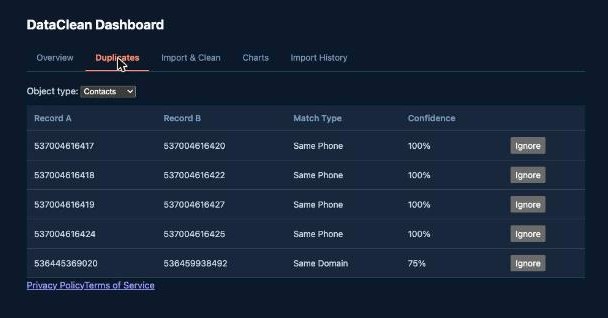
Duplicate contacts inflate your paid contact tier, split activity history across two records, and silently break workflows that key off a single "source of truth" contact. Most teams don't find out until a workflow misfires or a rep emails the same lead twice.
What DataClean does
Everything runs inside your HubSpot portal — no exports, no spreadsheets, no separate tool to log into.
Duplicate detection that actually catches duplicates
Fuzzy name matching, phonetic matching ("Jon Smith" vs. "John Smith"), and domain matching — on top of exact email/phone.
Review and merge with confidence
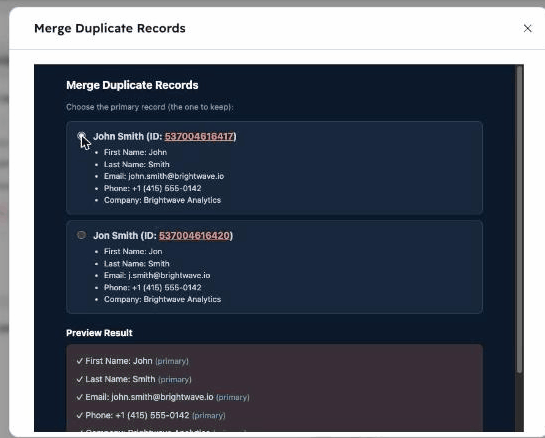
See exactly what will change before you commit — which record survives, which properties get combined. Merge one pair or a batch, with a short undo window.
Automatic formatting standardization
Phone numbers, email casing, and name capitalization get cleaned up to a consistent format, so search and segmentation stop breaking.
Clean before you import, not after
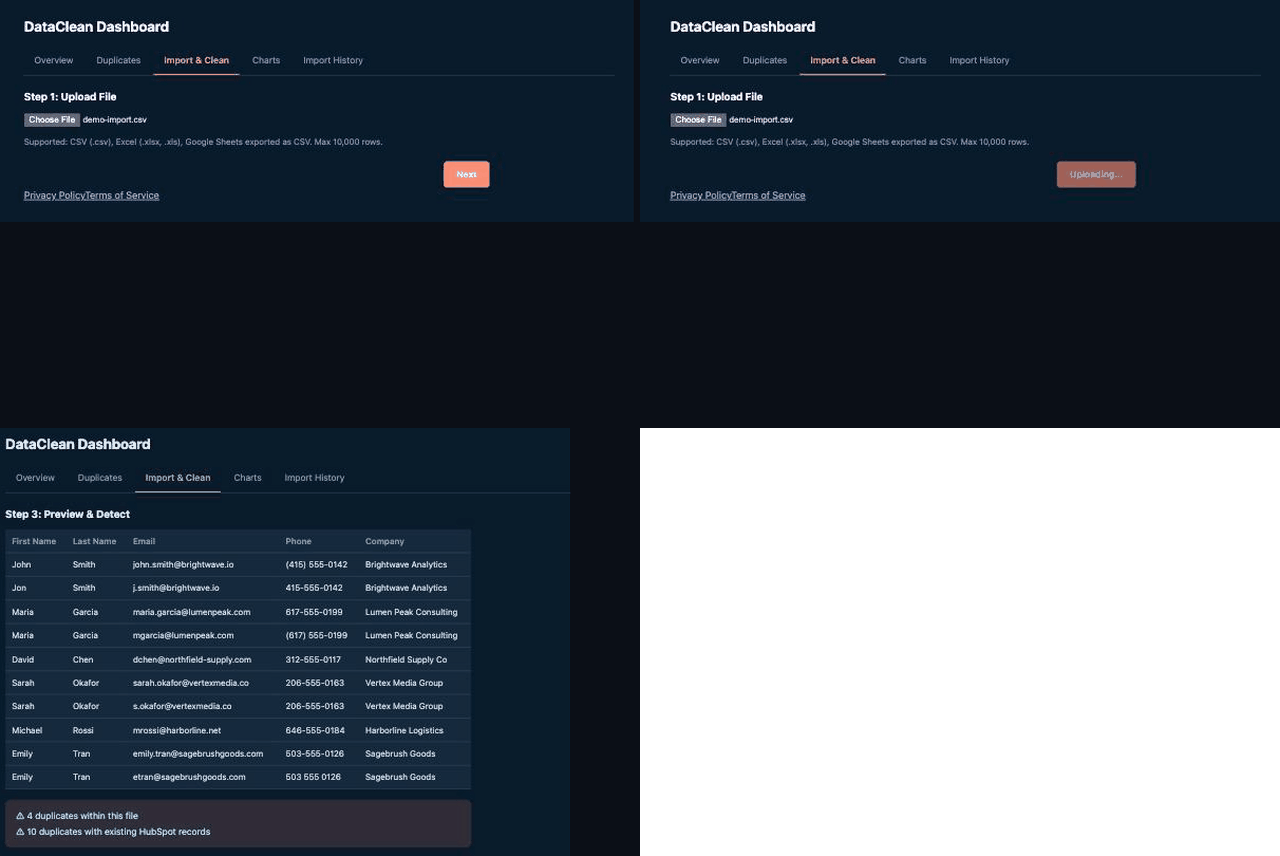
Upload a CSV or Excel file, map columns to HubSpot properties, and DataClean flags duplicates — against existing contacts and within the file — before anything gets written.
See it in your portal
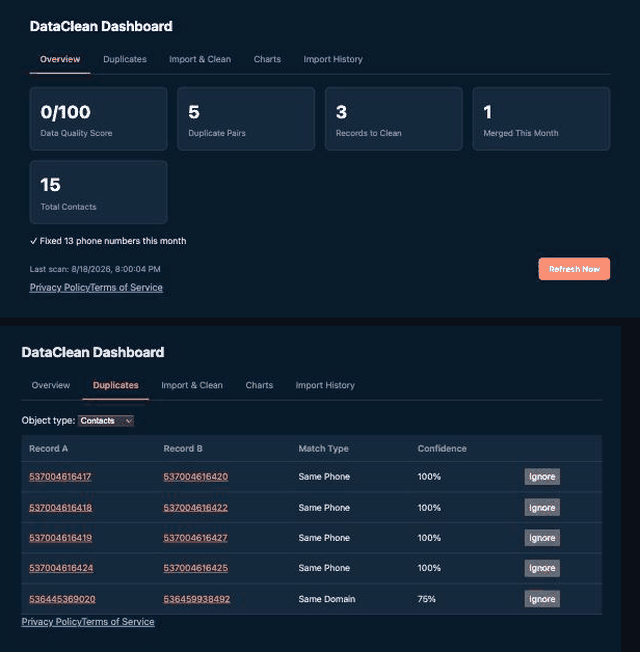
Real footage from a live test portal.
Simple pricing
Start free. 14-day free trial of Growth on every new install.
- Duplicate detection up to 1,000 contacts
- Exact + fuzzy matching
- Basic dashboard
- Unlimited detection
- Phonetic + domain matching
- Bulk merge (5/mo)
- Standardization
- CSV import cleaning
- Everything in Growth
- Unlimited bulk merge
- Advanced charts
- Priority support
Frequently asked questions
How do I find duplicate contacts in HubSpot?
HubSpot's native tool only merges contacts that already have identical email addresses or phone numbers. DataClean adds fuzzy name matching ("Jon Smith" vs. "John Smith"), phonetic matching ("Chris" vs. "Kris"), and shared-domain matching, and runs directly inside your HubSpot portal — install it, and it scans your existing contacts and companies for duplicates automatically.
Does HubSpot have a built-in duplicate merge tool?
Yes, but it only catches exact email or phone matches, and only surfaces them one at a time on individual records. It won't catch near-duplicates like misspelled names or the same person under two email addresses. DataClean adds broader detection plus a dashboard that lists every duplicate pair across your whole portal at once.
Is DataClean free?
Yes. The Free plan covers duplicate detection for up to 1,000 contacts with exact and fuzzy matching, at no cost. Paid plans (Growth at $9/mo, Pro at $19/mo) add unlimited detection, phonetic and domain matching, bulk merge, and CSV import cleaning, with a 14-day free trial.
Will merging duplicates affect my HubSpot workflows or data?
DataClean shows a side-by-side preview of exactly which record will survive and which properties will be kept before anything is merged, and merges go through HubSpot's own merge API rather than deleting records directly. A short undo window is available after each merge.
Can DataClean check for duplicates before I import a CSV into HubSpot?
Yes. Upload a CSV or Excel file, map its columns to HubSpot properties, and DataClean flags rows that duplicate your existing HubSpot contacts as well as duplicates within the file itself, before any of it is written to your portal.
Clean data, without the spreadsheet gymnastics
Install DataClean and see your duplicates in under 2 minutes.
Install Free on HubSpot